


Wednesday, 23 October 2013
Thursday, 17 October 2013
This is a shame post, to shame the retards at Microsoft who DMCA anything they can get their dirty hands on without even bothering to check.
I got this stupid DMCA notice just today.
I got this stupid DMCA notice just today.

Dear MediaFire User:
MediaFire has received notification under the provisions of the Digital Millennium Copyright Act ("DMCA") that your usage of a file is allegedly infringing on the file creator's copyright protection.
The file named Activator.zip is identified by the key (mnzdmwwymzw).
As a result of this notice, pursuant to Section 512(c)(1)(C) of the DMCA, we have suspended access to the file.
The reason for suspension was:
URL: http://mediafire.com
DATE: 16 October 2013
Dear Sir or Madam,
Microsoft has received information that the domain listed above, which appears to be on servers under your control, is offering unlicensed copies of, or is engaged in other unauthorized activities relating to copyrighted works published by Microsoft.
1. Identification of copyrighted works:
Copyrighted work(s):
Office 2013
Windows XP Professional
Copyright owner: Microsoft
2. Copyright infringing material or activity found at the following location(s):
http://mediafire.com/?mnzdmwwymzw <- This file is mine
http://mediafire.com/?40xekevo25gqn8k <- This file does not belong to me
http://mediafire.com/?mf8k7rqy5zvatar <- This file does not belong to me
The above computer program(s) is being made available for copying, through downloading, at the above location without authorization of the copyright owner.
3. Statement of authority:
The information in this notice is accurate, and I hereby certify under penalty of perjury that DtecNet, Inc. is authorized to act on behalf of Microsoft, the owner of the copyright(s) in the work(s) identified above. I have a good faith belief that none of the materials or activities listed above have been authorized by Microsoft, its agents, or the law.
We hereby give notice of these activities to you and request that you take expeditious action to remove or disable access to the material described above, and thereby prevent the illegal reproduction and distribution of this copyrighted work via your company's network.
We appreciate your cooperation in this matter. Please advise us regarding what actions you take.
If you have some issues please reply to info.antipiracy@dtecnet.com, reply to no-reply@dtecnet.com will be ignored.
Yours sincerely,
MarkMonitor Anti-Piracy Team
On behalf of Microsoft Corporation
One Microsoft Way
Redmond, WA 98052
United States of America
E-mail: info.antipiracy@dtecnet.com
Information about the party that filed the report:
Company Name: Microsoft LCA World Wide Anti-Piracy Team
Contact Address: One Microsoft Way, Redmond WA 98052
Contact Name: Peter Anaman
Contact Phone: +1 (425) 705-4165
Contact Email: panaman@microsoft.com
Contact Address: One Microsoft Way, Redmond WA 98052
Contact Name: Peter Anaman
Contact Phone: +1 (425) 705-4165
Contact Email: panaman@microsoft.com
Copyright infringement violates MediaFire's Terms of Service. MediaFire accounts that experience multiple incidents of alleged copyright infringement without viable counterclaims may be terminated.
If you feel this suspension was in error, please submit a counterclaim by following the process below.
Step 1. Click on the following link to open the counterclaim webpage. <Link to Counter Claim>
Step 2. Use this PIN on the counterclaim webpage to begin the process:
*****
Step 3. Fill in the fields on the counterclaim form with as much detail as possible.
This is a post-only mailing. Replies to this message are not monitored or answered.
The problem is that the file does not contain any
Office 2013 and Windows XP Professional Software/Cracks.
If you bothered to open up the file you will find it is a fscking BOOTDISK CREATOR for upgrading BIOS you retards!
Nothing to do with your crappy Software!
With this I am convinced that DMCA notices are being filed indiscriminately worldwide by automated bot.
I think everyone should be allowed to ignore such notices.
There should be some law for compensation for filing invalid notices.
Since when was guilty until proven innocent the default?
PS: If you want to see how a retard looks like here is a picture.
If you bothered to open up the file you will find it is a fscking BOOTDISK CREATOR for upgrading BIOS you retards!
Nothing to do with your crappy Software!
With this I am convinced that DMCA notices are being filed indiscriminately worldwide by automated bot.
I think everyone should be allowed to ignore such notices.
There should be some law for compensation for filing invalid notices.
Since when was guilty until proven innocent the default?
PS: If you want to see how a retard looks like here is a picture.
Monday, 7 October 2013
A possible solution to reduce the frequency of the TX DMA errors is as follows:
Log in via SSH/telnet,
Copy and paste the following line
uci set wireless.radio0.diversity=1 && uci set wireless.radio0.rxantenna=0x7 && uci set wireless.radio0.txantenna=0x3 && uci commit wireless && wifi
The command forces diversity and makes txantenna 0x3 and rxantenna 0x7
You should see this when you cat the /etc/config/wireless file
..............................
option diversity '1'
option rxantenna '0x7'
option txantenna '0x3'
..............................
This might help as well:
option disassoc_low_ack '0'
Log in via SSH/telnet,
Copy and paste the following line
uci set wireless.radio0.diversity=1 && uci set wireless.radio0.rxantenna=0x7 && uci set wireless.radio0.txantenna=0x3 && uci commit wireless && wifi
The command forces diversity and makes txantenna 0x3 and rxantenna 0x7
You should see this when you cat the /etc/config/wireless file
..............................
option diversity '1'
option rxantenna '0x7'
option txantenna '0x3'
..............................
This might help as well:
option disassoc_low_ack '0'
Saturday, 14 September 2013
This is how I block advertisement at DNS level on OpenWRT.
Blocking at DNS level is advisable because it does not impact bandwidth and latency.
Simply said it tricks your computer that your loopback address is where adserver are located but cannot be found so adservers are ignored totally.
AdServers are becoming more and more of a nuisance.
Fortunately OpenWRT makes this easy with the use of dnsmasq.
My web surfing experience has since greatly improved since
Here is how to do it in 2 steps(Yes it is that simple and powerful with Linux):
What this script does is telling your Router to
After that you will soon notice the disappearance of many irritating advertisement when using the web .
Hopefully this improves your web surfing experience as well as let you realise and embrace the power of shell scripting.
Blocking at DNS level is advisable because it does not impact bandwidth and latency.
Simply said it tricks your computer that your loopback address is where adserver are located but cannot be found so adservers are ignored totally.
AdServers are becoming more and more of a nuisance.
- They serve up malware advertisement,
- They load flash advertisements which waste bandwidth and increase latency.
- They run javascripts to try and "take over" your web browser via redirection and popups.
Fortunately OpenWRT makes this easy with the use of dnsmasq.
My web surfing experience has since greatly improved since
Here is how to do it in 2 steps(Yes it is that simple and powerful with Linux):
- SSH into your router
- Copy and paste this Command into the terminal
wget -O /etc/dnsmasq.conf "http://pgl.yoyo.org/as/serverlist.php?hostformat=dnsmasq&showintro=1&startdate[day]=&startdate[month]=&startdate[year]=&mimetype=plaintext" && /etc/init.d/dnsmasq restartWhat this script does is telling your Router to
http://pgl.yoyo.org/adservers/ to get a list of known adservers in a dnsmasq friendly format and save it to /etc/dnsmasq.conf if that command is successful then restart dnsmasq.After that you will soon notice the disappearance of many irritating advertisement when using the web .
Hopefully this improves your web surfing experience as well as let you realise and embrace the power of shell scripting.
Saturday, 31 August 2013
Before you continue reading, this piece is written by a OpenWRT user so you should expect some degree of bias towards OpenWRT specifically my builds but I backed this up with data. It should be reproducible.
LAN to WAN methodology is described here.
This post is about my testing of various firmware available for TL-WR1043ND Router.
Since the Router is TP-Link branded, all comparisons will be using TP-Link factory firmware as a standard.
The performance comparison would be LAN to WAN over Gigabit Ethernet Static NAT Routing.
I tested a total of 5 firmwares:
- Stock TP-Link firmware
- DD-WRT
- Gargoyle
- OpenWRT
- OpenWRT with tweaks
Observations
TP-Link firmware
My assessment on this firmware is that it is targeted as a standard multimedia Router, offering MediaServer, Samba and FTP on a Single Router.
It is a firmware with fixed flash partitions with a small sector for storing your Router settings persistently.The webserver uses a frame layout to reload only a single page, the setting page in the center. There is not much I can say about it except the Routing Performance.

It averages below 140Mbps. Performance may vary based on the running processes but by default there is very little running processes to tune so you can estimate the max to be 150Mbps. It uses the standard GCC mips cross compiler to generate the firmware which partly explains the mediocre performance. It would be suitable for users with a subscription line of 100Mbps.
DD-WRT firmware
Now DD-WRT is a very interesting software. Yes I first started on 3rd Party firmware on DD-WRT which I later moved on to OpenWRT. However DD-WRT firmware was quite interesting I took a closer look at it.
DD-WRT is structured very much like TP-Link firmware it has only 64KB fixed partition for storing user settings, although there are ways to enable optware.
All the features seen on the webserver is all the features you can access.
1 thing is for sure, it is jam packed with features. 1 feature which stock I could not find on DD-WRT but could find on stock firmware is the media server. This however does not come as a surprise, the biggest package to enable mediaserver feature is the ffmpeg codec which is impossible to fix into DD-WRT which is already jam packed with features.
When I telnet into router it shows that the router uses GCC linaro 4.8 compiler to optimize the firmware as the same as OpenWRT.
It uses some of OpenWRT's components and also a updated kernel version 3.5.7.
The web interface while it looks nice seems messy to someone using OpenWRT for a long time. By default all additional features are disabled so the Routing test below is probably the best you can get. Performance isn't bad.

It maxes at below 250Mbps so it will be good for 200Mbps lines.
Gargoyle
Gargoyle is based on OpenWRT with its own javascript based user interface on top. It prides on its control over QoS Services. It uses linaro gcc 4.6 like OpenWRT. Technically speaking it should perform around the same as OpenWRT however this is not the case as I have seen later. Some differentiating features not found by default on other firmware is the Tor routing function. It allows installation of addition software as like OpenWRT JJFS persistent storage is mounted on top of the read only squashfs but the software repository is limited. This Gargoyle firmware which I tested is based on OpenWRT Attitude Adjustment. After disabling MSS Fix a optional iptable feature which slows down routing the results are as shown.

As shown in the chart routing performance averages above 170Mbps. If a bandwidth margin is considered it would be good for 150Mbps connection.
OpenWRT Attitude Adjustment
This is the standard OpenWRT Attitude Adjustment release, it comes bare with very little features out of box. After disabling MSS fix the following result is obtained.

It averages below 250Mbps like DD-WRT so it should be good for 200Mbps line.
OpenWRT Attitude Adjustment Optimized
This is my build of OpenWRT Attitude Adjusment for WR1043ND.
Basically I added features functionally equivalent to stock firmware, added a couple of additional features like L7 filter(also found in DD-WRT but disabled by default). The build is platform specific optimized and targeted at MIP24Kc Processor. I also included Web Optimizations and Fixes and stripped out all debugging features I can find. You can either have debug or performance but not both. Basically this is OpenWRT on steroids. After many trial and error I finalised it when there is consistent observable improvement.
To make the comparison fair I disabled L7 filter and MSS fix(Actually it outperforms the rest even without it at 270Mbps!).
So below is the result of it without L7 filter and MSS fix.

So this goes to show how optimization can improve performance on embedded system. This post might invite flaming between 3rd party firmware die hard fans but I think the graphs speak for themselves.
Saturday, 27 July 2013
Moved everything related into github.
Simply Fast Convenient.
Should have done that long ago.
Attitude Adjustment TP-Link WR1043ND Backup Download
Attitude Adjustment TP-Link WR1043ND Firmware Download
Simply Fast Convenient.
Should have done that long ago.
Attitude Adjustment TP-Link WR1043ND Backup Download
Attitude Adjustment TP-Link WR1043ND Firmware Download
Wednesday, 22 May 2013
For users on fibre you can set port priority using swconfig
swconfig dev rtl8366rb port 1 set priority 1To check
swconfig dev rtl8366rb port 1 get priorityTo get it to run persistently on boot
echo 'swconfig dev rtl8366rb port 1 set priority 1' >> rc.local
This will only work on patched rtl8366rb drivers.
For unpatch openwrt firmware you have to use vconfig.
Updated to R37083
Attitude Adjustment with full ipv6 support including LuCI.
Downgrade the dhcpmasq to a non ipv6 version as the function is already added into the default Attitude Adjustment.
Review all the LuCI options and fix them, expose more wifi options.
This release is really a good one!.
For WR1043ND
I also patched lighttpd to use
server.network-backend = "linux-sendfile"
server.event-handler = "linux-sysepoll"
This is done by patching the Makefile to enable linux-sendfile function which I do not know why it was disabled in OpenWRT's lighttpd Makefile.
I did it by #undef sendfile_broken and #define have_send_file
I managed to add the repo to github
OpenWRT TL-WDR4300
OpenWRT TL-WR1043ND
For my jperf (iperf +java frontend) I recorded increase in NAT speeds for both Routers but I would like those with highspeed internet to give me feedbacks.
Reminder: setting Wireless Region to 'US ' unlocks all "Wireless Goodness"
You can check updates on OpenWRT side using their development site.
Cheers!
Update:
Updates refreshed.
Removed Atheros Options since they are actually not support from documentation.
Integrate Jumbo Switch and Storm Filter since there are no issues.
Attitude Adjustment is Tagged and released!
I have also released a Beta version with Jumbo Frames and Storm Filtering
ssh into the router and use
swconfig dev rtl8366rb show (to display switch setting)
swconfig dev rtl8366rb set max_length 3
swconfig dev rtl8366rb set apply (apply the settings)
The rest you can figure out on your own using help option.
Note that the Jumbo Frame is a switch only option reason is that the AR9132 SoC DOES NOT SUPPORT JUMBO FRAME only the switch RTL8366RB do.
I have just release another update, changes are as follows:
-Rename some of the stuff in LuCI
-Removal of excess packages(torrents etc) now 1.8 MB left for you to install the stuff you want
- There is a lot of feedback from people who want to install specific packages for their own needs so the best way is to give them space to do that.
-Update certain packages
-Rename PnP and uShare modules device information
-Remove pure-ftpd and added vsftpd with TLS
(managed to compile successfully and tested it)
- vsftpd with TLS does encrypted FTP using less flash and less RAM
OpenWRT Attitude Adjustment Release For TL-WDR4300
LAN to WAN Wired Benchmark Software Routing
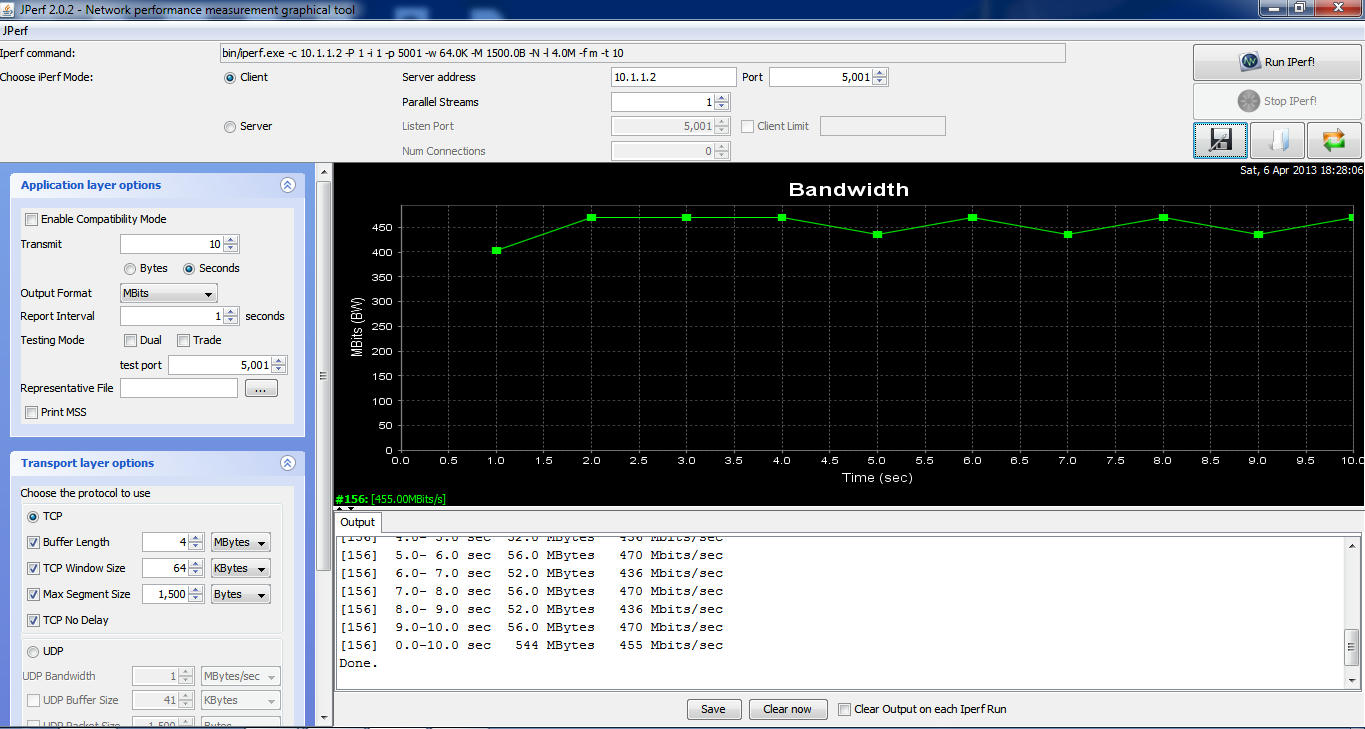
OpenWRT Attitude Adjustment Release for TL-WR1043ND
LAN to WAN Wired Benchmark Software Routing
With L7-Protocol and QoS (Default Configuration)

With L7-Protocol and QoS Service Stopped MSS disabled

Wireless LAN to WAN (2M Line of Sight)
With L7-Protocol and QoS Service Stopped MSS disabled
Using AES WPA2-PSK encryption 40MHZ Fat Channel, noscan enabled dtim_period=1
Basically what you can expect on Wireless.
Note: Results may vary due to interference of surrounding networks

Factory for upgrading from TP-LINK stock firmware to OpenWRT firmware
Sysupgrade for upgrading from older OpenWRT version to newer OpenWRT version
Subscribe to:
Posts (Atom)


