Microsoft Laptop

  • Subscribe to our RSS feed.
  • Twitter
  • StumbleUpon
  • Reddit
  • Facebook
  • Digg

Thursday, 2 June 2011

How to Mod your Laptop VGA BIOS

Posted on 22:34 by Unknown
Basically there are 2 locations where the VGA BIOS in laptops.
Some OEMS embed the VGA BIOS in the EFI/BIOS in your laptops,
other OEMs have a separate VGA BIOS firmware on the VGA Card itself.

TYPE 1
As a general rule laptops with discrete MXM board modules like the (picture below) has
the VGA BIOS as a separate piece of code located on the module itself.
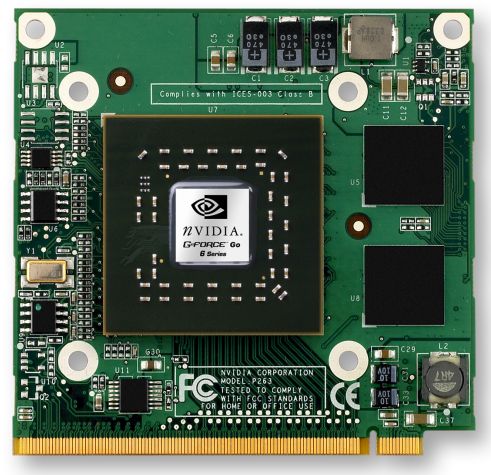
It is NOT part of the EFI/BIOS of the Mainboard.

TYPE II
For OEM Boards with a GPU embedded on the Mainboard itself the VGA BIOS usually exist as a chunk of Code inside the BIOS of the Mainboard itself.
(Picture below shows the GPU on the top left corner on the mainboard covered by the black plastic)


Nowadays more and more OEMs are using TYPE II method of integration because
1) They can make the laptop more compact and light because separate MXM modules increase the thickness of the laptop.
2) It is cheaper to integrate everything on the mainboard using BGA soldering rather than have PCI-E connectors.

This article talks about modifying Type II VGA BIOS only.

First you have to identify the Type of Firmware the laptop uses, this is depends on the BIOS Vendor used by the OEM. An OEM can use a different BIOS vendor for different models.

The most prominent BIOS vendors are: Insyde, AMI, Phoenix, AWARD and Intel.

On the website mydigitallife you can find many tools coded by the members for BIOS disassembly.

We are going to use their tools to dissemble the VGA Module from the BIOS.

In this example, the Aspire 4740G uses the Insyde BIOS so download the PhoenixTool which is capable of dissembling Phoenix, Insyde, Dell and other EFI BIOS.

After downloading the PhoenixTool we decompress the PhoenixTool contents to a new folder.


We extract the PhoenixTool to a folder called  "NEW". The main program is called PhoenixTool.exe
After decompressing the disssembly Tool we proceed to download the EFI/BIOS from the OEM website and decompress it as well..
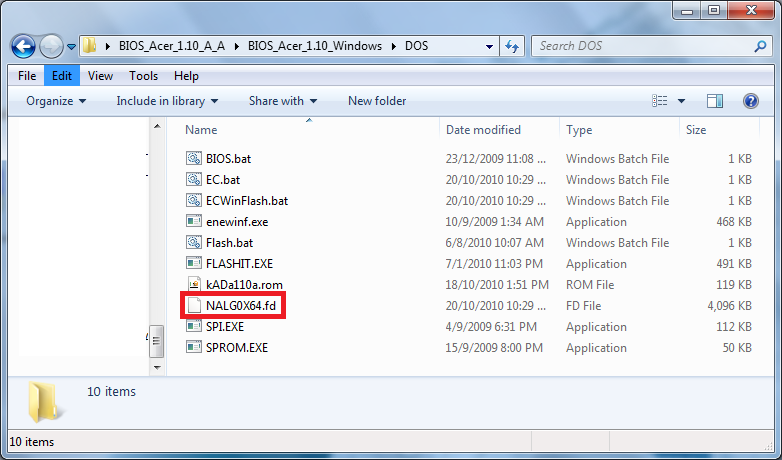

From Above we can see the Complete BIOS Firmware is called NALG0x64.fd.
BIOS usually uses file extension such as BIN, ROM, BIO, WPH, FD and many more. Different BIOS Vendor usually use a different identifier.


When we use the PhoenixTool.exe to open the NALG0x64.fd file, the tool also display the emergency Insyde Recovery Filename.


After the modules have been dissembled you should see the screen above. The modules have been dissembled in a newly created folder called "DUMP" where the original NALG0x64.fd is located.


The Red Box shows the VGA BIOS module. The VGA BIOS module is usually a 70-60KB file, to confirm if it is the VGA Module, you open it with a dissembler and check the content, you should see Nvidia text reference in the binary.


The dissembly of the file shows a lot of Nvidia Text Reference to further confirm if it is the exact module you want you should Google the SKU Code in the example above it is "GT218" which references to G310M Nvidia GPU.
Some laptop BIOS has more than 1 VGA BIOS because 1 Model can have many variations of Different Nvidia SKU GPUs.A good example would be the Acer Aspire 4741G.
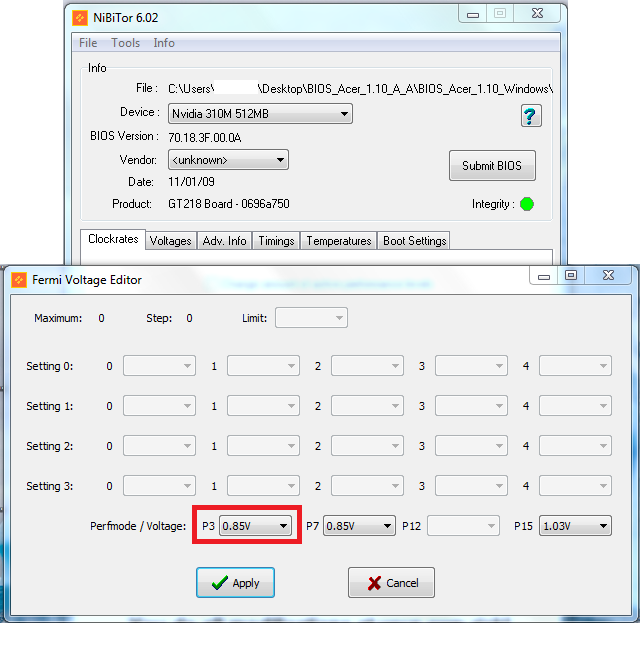
Next Download the Nibitor from MVKTECH website. Open the VGA Module and choose "Tools" Fermi Voltage Editor (For Newer Generation of Nvidia GPUs).
For ATi you would probably use Radeon BIOS Editor (RBE).
As you can see the original BIOS has the P3 state which is the default state (the lowest performance state) set at a voltage is 0.85V that is why when using HWMonitor you will never see the voltage drop below 0.85.
The lowest performance state can however use a lower voltage of 0.80V.


So we set the P3 State to 0.8V and Apply. Save the Modified VGA BIOS and exit.


Using EzH20, a Insyde BIOS Editor we open the original NALG0x64.fd file.


Select Components -> Replace Module. Each Insyde Module has a Unique GUID identifier.
8 Character - 4 Character - 4 Character - 4 Character - 12 Character
The Module we seek has the identifier "AC1E1B97-69C4-475D-8471-0F3893802F96"


Under "Module to Load" browse to the modified VGA BIOS.


Under "Change ROM GUID" enter the original identifier: "AC1E1B97-69C4-475D-8471-0F3893802F96"
Then Patch the Firmware.


Finally Save the Modified Firmware and flash it with the Insyde flashit Tool while replacing the original NALG0x64.fd with the modified NALG0x64.fd.
Email ThisBlogThis!Share to XShare to FacebookShare to Pinterest
Posted in | No comments
Newer Post Older Post Home

0 comments:

Post a Comment

Subscribe to: Post Comments (Atom)

Popular Posts

  • Configuring Pure-FTPd with TLS on OpenWRT
    This is a simple guide to configuring Pure-FTPd on OpenWRT which is available on the TP-Link WR1043ND OpenWRT Image I compiled. Pure-FTPd i...
  • How to Mod your Laptop VGA BIOS
    Basically there are 2 locations where the VGA BIOS in laptops. Some OEMS embed the VGA BIOS in the EFI/BIOS in your laptops, other OEMs have...
  • List Of Modified BIOS Collection
    Here are the list of Modified BIOS Collection (mainly SLIC Mods), no warranty provided use at your own discretion! Acer Aspire 4520G BIOS Ac...
  • Delete Windows System Files
    If you play around with Windows System Files sometimes it is not possible to delte them off after you had your fun. The following commands w...
  • Free Windows Themes and TuneXP
    Besides LINUX and UNIX system i also happen to know some good Windows Tools that everyone should have in their PCs Note the following tools ...
  • Acer Phoenix BIOS Emergency Recovery
    This is for people who don't listen and interrupt the flashing BIOS for unknown reasons. This will work provided the BIOS BootBlock isn...
  • Internet Explorer Tweak
    Here is a registry tweak for Internet Explorer Similar to the Mozilla Firefox tweak this enable you to increase the number simultaneous ser...
  • How to obtain the DSDT from your laptop
    There are many ways to rip the DSDT out of the laptop BIOS. If there is a BIOS editor it is possible to rip out the .AML file. However below...
  • Fixed My Left Speaker
    Ok, I had issues with my left speaker on my laptop. It was dead. So if I were to order the exact replacement it would cost more than $100 fo...
  • Changing the Acer Arcade Shortcut
    While surfing the Windows Registry (You must be thinking that I am weird =P) yesterday I found something interesting It is actually possible...

Categories

  • 32bit
  • 64bit
  • acer
  • ahci
  • amd
  • apple
  • aspire 4530
  • aspire 4535G
  • aspire 4740
  • atheros
  • atom
  • BIOS
  • boot
  • cleanup
  • configure
  • device
  • disk
  • dismantle
  • download
  • driver
  • fan control
  • firefox
  • firewall
  • firmware
  • fix
  • flash
  • graphics
  • hwmonitor
  • internet
  • linux
  • macs
  • microsoft
  • modified
  • nvidia
  • optimize
  • overclock
  • performance
  • power savings
  • powermizer
  • proxy
  • ram
  • Realtek
  • review
  • secure
  • shortcut
  • speaker
  • synaptics
  • temperature
  • theme
  • timeline
  • tweak
  • undervolt
  • update
  • wallpaper
  • windows 7
  • windows vista
  • Windows Xp
  • winsat
  • wlan

Blog Archive

  • ►  2013 (10)
    • ►  November (2)
    • ►  October (3)
    • ►  September (1)
    • ►  August (1)
    • ►  July (1)
    • ►  May (1)
    • ►  January (1)
  • ►  2012 (4)
    • ►  September (1)
    • ►  June (1)
    • ►  March (1)
    • ►  February (1)
  • ▼  2011 (21)
    • ►  September (1)
    • ►  July (4)
    • ▼  June (3)
      • Ultimate Wireless Lan Upgrade Guide For Windows & ...
      • Nvidia & Acer Screw Ups
      • How to Mod your Laptop VGA BIOS
    • ►  May (3)
    • ►  April (3)
    • ►  March (4)
    • ►  February (2)
    • ►  January (1)
  • ►  2010 (36)
    • ►  December (3)
    • ►  November (2)
    • ►  October (4)
    • ►  September (1)
    • ►  August (5)
    • ►  July (1)
    • ►  June (5)
    • ►  May (3)
    • ►  April (3)
    • ►  March (6)
    • ►  February (1)
    • ►  January (2)
  • ►  2009 (81)
    • ►  December (3)
    • ►  November (3)
    • ►  October (9)
    • ►  September (5)
    • ►  August (1)
    • ►  July (5)
    • ►  June (8)
    • ►  May (15)
    • ►  April (10)
    • ►  March (13)
    • ►  February (8)
    • ►  January (1)
  • ►  2008 (8)
    • ►  November (5)
    • ►  July (3)
Powered by Blogger.

About Me

Unknown
View my complete profile