Microsoft Laptop

  • Subscribe to our RSS feed.
  • Twitter
  • StumbleUpon
  • Reddit
  • Facebook
  • Digg

Tuesday, 2 February 2010

Full Acer Aspire 4530 Optimization

Posted on 19:31 by Unknown
Some people just can't be bothered to READ yet want their issues fixed.

1)Dissemble the Computer
Dissemble the fan completely.
Clean up all the dust in the fan.
Throw away the thermal pad the thermal sink interface well with the GPU without the need for a thermal pad.
Replace their factory thermal paste with MX-2 (recommended)

2)Undervolt the Griffin CPU using K10STAT
1)Make sure the voltage setting is stable and tested using K10STAT and Intel Burn In.

3)Download Acer Aspire Fan Control Program
Run the speed to high during gaming.

4)If you want you can cut larger vent holes into the laptop casing but this is optional.

5)If you have webcam driver issues, try Bison Drivers(32/64bit Compatible) and make sure during dissembly the large white connector in the top left hand corner is fully secure.

Please don't ask me the same question again & again I am tired of repeating myself like a broken tape recorder.
Read More
Posted in | No comments

Friday, 15 January 2010

Acer Smart Power Manager

Posted on 22:34 by Unknown
Finally some useful software from Acer
Please note: Different Power Smart Manager is meant for different configuration.
Some Power Smart Manager supports Radeon Switchable meant for laptops with ATi Radeon Specification.
So to get the best fit, look for the latest Acer Laptop with specification as close to yours as possible.

Acer Smart PowerManager

Download here
Conserve Power On the Go.
Installable on most Acer/Packard Bell/Gateway/Emachine Laptops (Even on Laptops that doesn't came with this originally).
When you install it on a (eg. Packard Bell) Computer the software calls itself Packard Bell Power Save!

Optical Drive PowerManager

Download here
Conserve Power On the Go.
Installable on most Acer Laptops (Even on Laptops that doesn't came with this originally).
Software originally meant for Acer Aspire Timelines but work on Non Timelines as well.
Read More
Posted in acer, download, power savings | No comments

Wednesday, 6 January 2010

Acer Aspire 4530 Drivers

Posted on 01:00 by Unknown
Windows 7 works perfectly on Acer Aspire 4530.
There are no compatibility issues.

Acer Aspire 4530 BIOS --------------------------------------------------------------------------------------------------------

Those who want Windows 7 OEM activated on Acer Aspire 4530 laptops go here
You will find the SLIC 2.1 BIOS Files there just flash using the flashing utilities provided by Acer and activate.

There are 3 Version 1.3333, 1.3334 and 1.3334 with some updated modules from 1.3336
(Because there is a booting issue with 1.3336 BIOS)
The ones with New VGA BIOS is modified with a updated VGA BIOS Module taken from a Emachine Laptop also equipped with Nvidia 9100M G Graphics. So take your Pick.
My personal recommendation is Z05_3334 with new VGA BIOS Module.

------------------------------------------------------------------------------------------------------------------------------------

Acer Aspire 4530 Application Launch Manager ------------------------------------------------------------------------------

Launch Manager (For Windows 7)
Custom ShortCut button tweak continued to work.

------------------------------------------------------------------------------------------------------------------------------------

Nvidia Chipset Driver(Motherboard Driver)----------------------------------------------------------------------------------

Download & Install Chipset Driver (from Nvidia) to remove the no coprocessor message.
Nvidia Chipset 64bit 
Nvidia Chipset 32bit


-------------------------------------------------------------------------------------------------------------------------------------

Graphics Adapter Driver (Display Driver)------------------------------------------------------------------------------------

Download and install the latest Nvidia Verde Drivers.

------------------------------------------------------------------------------------------------------------------------------------

Realtek Card Reader Driver (Card Reader Driver)----------------------------------------------------------------------------

Please note Acer failed to include the Latest Realtek USB Card Driver in their download page.
Please download it here.


------------------------------------------------------------------------------------------------------------------------------------

Realtek Audio Driver (Sound Driver)------------------------------------------------------------------------------------------

You can download it from here or from Realtek Website

------------------------------------------------------------------------------------------------------------------------------------

Synaptics Touchpad Driver ---------------------------------------------------------------------------------------------------

Download the driver from HP it will enable Multitouch (2 Finger Scroll, 3 Finger Press etc)

-----------------------------------------------------------------------------------------------------------------------------------

WebCam Software -------------------------------------------------------------------------------------------------------------

SuYin or Bison (If you have webcam issues this might help)

------------------------------------------------------------------------------------------------------------------------------------

The new Windows Experience Index for Acer Aspire 4530 (Remember to update DirectX otherwise the score will be 3.9)
If you used 64bit Windows 7 the score will be even higher...Below was done using 32bit Windows 7.

Gaming Temperatures on Windows 7 in Acer Aspire 4530


Remember to set Restore Point after you finish setting up all the software:
Go to Control Panel >> System >> Advance System Settings >> System Protection >>
Create Restore Point
Any issues regarding Windows 7 and Aspire 4530 post below.

Full Optimization for Aspire 4530 here
Realtek Driver Mod

Read More
Posted in acer, aspire 4530, driver, windows 7 | No comments

Friday, 18 December 2009

Fixed My Left Speaker

Posted on 00:59 by Unknown
Ok, I had issues with my left speaker on my laptop. It was dead.
So if I were to order the exact replacement it would cost more than $100 for the entire front panel palm rest moreover it was also out of warranty.
But it is not worth it because a speaker isn't worth that much for a replacement.
I had 2 approaches.
1)Remove the left speaker and replace the speaker (actually it is called a tweeter) with a Generic Internal Part.
This failed because the Generic Tweeters sold are not as high quality as the original and wasn't able to generate the exact frequency and amplitude of the original and undamaged right speaker.
2)Buy a off the shelf speaker set from ebay and replace the left speaker.
This approach worked.
I got a speaker set of another laptop model.
The speaker is an identical 4 ohm 2 watt speaker.
However I had to cut out the speaker connectors as they are split into 2 pin left, 2 pin right rather than the original 4 pin .
After some modification I was able to get the connectors right. Plugging them in works as well, producing the right sound.
However the right speaker was still slightly louder, I suspect the original speaker had an air column under which produced louder bass.

I am still satisfied with the final result as 1)it doesn't cost much 2)the new speakers were of comparable sound quality.

Edit:
The slight difference in sound quality wasn't due to the air column, it was due to the positioning under the speaker cover I shifted it slightly and attached it using tape and the difference was alleviated.
Read More
Posted in aspire 4530, speaker | No comments

Friday, 4 December 2009

Nvidia Driver Release

Posted on 17:10 by Unknown

3D Mode


2D Mode


Windows Desktop Default Mode


Nvidia WHQL Notebook Driver version 195.62 is released.
Download them from Nvidia Website here
Please note that the new Nvidia Driver fixes the issue of not being able to throttle to default clock in Windows Desktop so please use this driver instead of the Acer Download (187.XX) which has the problem.
This driver is recommended.

Read More
Posted in download, driver, graphics, nvidia, powermizer | No comments

Acer Aspire 4530 Actual Fan Control

Posted on 11:07 by Unknown
I found the actual control variable of Acer Aspire 4530 Fan.
It is actually a hex value located in the EC.
To access the EC Control Variables, Download and install Rw-Everything.
Next run the program.
Select EC Button to view the EC Variables
You should see the following as shown below:
If you set it to 13 then click done, you will quickly hear the fan spining at maximum speed.
Other values between 0-13 also alter the RPM but there are also values in between that does nothing.
Happy Experimentation!
Read More
Posted in aspire 4530, fan control | No comments

Monday, 30 November 2009

K10STAT AMD Griffin Processor UnderVolting Guide

Posted on 07:32 by Unknown


FAQ


Why UnderVolt?


Because when a lower voltage can sustain your clockspeed, a stress tested undervolt will preserve battery life and reduce heat generated without affecting your CPU performance at all !!


Zero performance handicap with less heat output and longer battery life!! (Your yield may vary)


If it is so great why manufacturers don't undervolt?


Because they manufacture processors in bulk you can't expect them to test and undervolt every single processor to the best of its capabilities!


So they simply take the a slightly higher approximate stable voltage out of the whole batch and burn the same value into every chip of the same family!


Will it spoil my processor?


No it won't, because it doesn't involve making it hotter.

In non-biological system usually heat destroys and cold preserves.

During testing, BSOD (Blue Screen of Death) is common but after a restart the Processor Voltage should restore to original value.

After finalizing the stable voltages, then you set the program to run undervolted values every startup.

I strongly recommend stress testing ALL THE P-STATES before setting up the final values so your computer will not crash when you are doing your important work (or in the middle of gaming).


Why don't you use Windows Startup to run it?


Microsoft seems to be encouraging running start-ups through Task Scheduler, not to mention Task Scheduler allows good control over program automated execution.


Which Processor is it for ?


Basically AMD K10 Series Processors.


But I am using Intel Processors?


For Core 2 Duo Processor you can use RMClock, if you are using 64bit Operating System you might need to google for 64bit libraries to replace some of the 32bit libraries. You can google it up.

For Core i3/5/7 users, I haven’t heard of any undervolting tool but I personally seen in the BIOS/EFI ACPI P-State Control is Unlockable, so BIOS/EFI modding is a possible solution.


But I am using AMD TL Series and below Processors ?

Use RMClock as well refer to “But I am using Intel Processors”.

Older AMD Processors should be supported by RMClock.


Getting Started


Firstly download K10STAT from here (I didn't make this program).

I Extracted it to C:\Program Files\K10STAT (K10STAT is 64bit and 32bit capable as well)

Configure K10STAT


When you run K10STAT you should see the menu above.

You can set a maximum of 5 Profiles.


FID: The multiplier for the Processor

(FID doesn't work in AMD Multiplier Locked Processors)


DID: The P-State of the Processor

Note all Processors supported by K10STAT uses K10 Power Design


CPU-Voltage:


That is what we are interested in.

To set the voltage for P0 simply select P0 and select the corresponding voltage and apply.

Remember: Min 0.75 V Max 1.2 V!

Caspian CPUs maybe able to run lower than 0.75V

For me -0.05V is the Max Stable voltage for P0 state any lower it BSOD!


Up%:


This is the amount of CPU usage load before the processor changes P-State from high (eg.P3) to low (eg.P2)  to meet the minimum load requirements.

Currently it is set at 60% meaning it will switch from P2 to P1 when processor detect 60% CPU load and the same applies from switching from P1 to P0.


Down%:


It is basically the opposite of Up %

This is the amount of CPU usage load before the processor decrease P-State to meet the minimum load requirements.


Up (milliseconds):


It is the time delay the processor takes to switch from one P-State to the next higher performance P-State.


Down (milliseconds):


It is basically the opposite of Up.

It is the time the processor takes to switch from one P-State to the next lower performance P-State.


After you have set suitable values (-0.05 recommended on first try).


Use Windows Processor Power Management to test different levels.


Use 4 Windows as shown above, to monitor all the P-States so it is more convenient to access the values and monitor the states.


First remember to enable K10STAT Clock Control


To test simply click on the Core of the P-State immediately the Processor will assume the P-State.


Test each P-State by running Intel Burn In (Google and Download) or any suitable CPU loading tool.


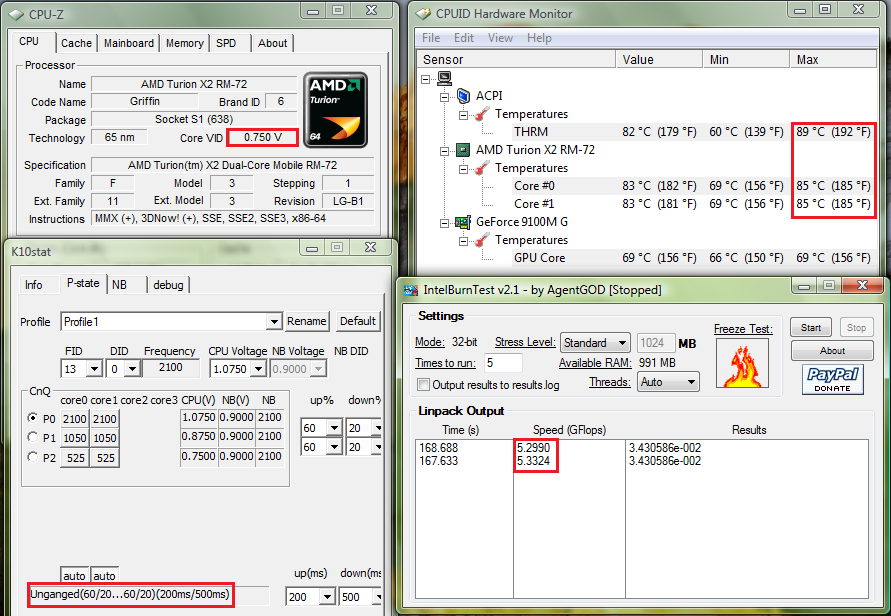
For me the voltage values that passed Intel Burn In test are 1.075V, 0.850V and 0.750V.


At 1.025V, it BSOD after 2 mins.

At 1.0372V-1.050V it produced the wrong result.


Test all P-States you have modified so it won’t crash whenever the CPU switches to any of them.


To pass LinPack, the result calculated by the CPU must be consistent.

After you have affirmed the stable voltage values then you may proceed to set it to start automatically.


Setting K10STAT for StartUp


Open Task Scheduler by accessing Start Menu\All Programs\Accessories\System Tools\Task Scheduler


Create a Task


Alternatively you can make it run as a SYSTEM task (as shown below)


If you want the K10STAT icon to appear in the systray run the program under your user account.

If you run it as SYSTEM account the program will run too(in the background) but it will not be visible in the systray.

Click "Change User or Group" then Enter "System" then choose "Check Names" then select OK.


or you can create it as a startup process as shown below. (RECOMMENDED because it will run before a logon is required)


**Please note a file called K10stat.dat containing the undervolt settings will be created in the C:\Windows\System32 folder because it is the default path for admin rights unless you changed the "Start In (Optional)" parameters, the setting just under the "Add Arguments (Optional)" parameters as shown below.


The program will load the settings from K10STAT.dat so make sure all the changes are written to the file.

When you launch K10STAT manually a new K10STAT.dat will be created in C:\Program Files\K10STAT which Task Scheduler WILL NOT LOAD.

It will only load the K10STAT.dat in C:\Windows\System32 unless you change the "Start In" parameters to "C:\Program Files\K10STAT".


If you do not specify “Start In” parameters, the file “K10stat.dat” will be created in C:\Windows\System32 (Default Administrator Path) as shown below.


The following arguments are available (Source: http://dsus4.blog126.fc2.com/blog-entry-3.html)


Command Line Option

-lp:#(1-5) - load profile#(1-5) and write to MSR.


-nw - Start K10stat with No Window.


-ClkCtrl:#(0-4) - Enable Clock Control by K10stat.


0: No Control

1: Control clock of each core.

2: Control clock of all cores together (Criterion is most loaded core).

3: Control clock of all cores together (Criterion is average of all cores).

4: Control clock of all cores together (Criterion is least loaded core).

If you set -ClkCtrl:2 you get slightly better performance at the expense of more power consumption because the processor increases P-States together rather than independently.


Because Windows proceed on the assumption that cores are unganged by default on the RM/ZM Series processor.

Whether it is ganged by default is dependent on the hardware design.


AMD K10 Processors were designed originally to use unganged mode to conserve power.


-StayOnTray - use this option with -nw for Clock Control Mode.(Note after a sleep if the CPU MSR registers are resetted, voltages will revert to default, hence you need -StayOnTray to ensure it is always running in the background)

e.g.Target:

"C:\Program Files\K10stat\K10STAT.exe" -lp:1 -ClkCtrl:2 -StayOnTray -nw


Finally you can Control your CPU using the K10STAT Systray if you enabled -StayOnTray manually as well.


-ClkCtrl:#(0-4) - Enable Clock Control by K10stat (Refer to above).


0:No Control


1:Control clock of each core.

UnGanged means each CPU Core #0 & #1 operates independently of each other so at any one time their frequency and DID could be different.(This is the original intent of the design of the Turion Chips as they are given different power planes.)


2:Control clock of all cores together (Criterion is most loaded core).

This means the CPU will raise/drop the DID of Core #0 & #1 together when it detects the one of higher Core has reached the criteria for a Frequency boost or Throttle Down.


3:Control clock of all cores together (Criterion is average of all cores).

This means the CPU will raise/drop the DID of Core #0 & #1 together when it detects the average of both core has reached the criteria for a Frequency boost or Throttle Down.


4:Control clock of all cores together (Criterion is least loaded core).

This means the CPU will raise/drop the DID of Core #0 & #1 together when it detects the one of lowest Core has reached the criteria for a Frequency boost or Throttle Down.


A new function called Lock-P-state is available in new versions of K10Stat.


It is another way you can lock the P-state for P-state testing again you should enable Clock Control before performing the P-State Testing.


Down Core refers to switching off 1 of the Cores either Core0 or Core1.


Testing


__________________________________________________________________


Original Factory Default Settings

_________________________________________________________________________


UnderVolted 1.075V


In Unganged Mode

__________________________________________________________________


UnderVolted 1.075V


In Ganged Mode (Based on highest core)

__________________________________________________________________


Thats All !


AMD Technical Documentation Regarding Turion Processors here


(Contains Temperature Limits P-States and Voltages)

Read More
Posted in amd, overclock, power savings, undervolt | No comments
Newer Posts Older Posts Home
Subscribe to: Posts (Atom)

Popular Posts

  • Delete Windows System Files
    If you play around with Windows System Files sometimes it is not possible to delte them off after you had your fun. The following commands w...
  • Internet Explorer Tweak
    Here is a registry tweak for Internet Explorer Similar to the Mozilla Firefox tweak this enable you to increase the number simultaneous ser...
  • How to Mod your Laptop VGA BIOS
    Basically there are 2 locations where the VGA BIOS in laptops. Some OEMS embed the VGA BIOS in the EFI/BIOS in your laptops, other OEMs have...
  • Acer Phoenix BIOS Emergency Recovery
    This is for people who don't listen and interrupt the flashing BIOS for unknown reasons. This will work provided the BIOS BootBlock isn...
  • Secure Your Windows CD-Key (For Vista and 7)
    As you know everytime you activate a Windows Installation your Product Key can be retrieved via Software means. Don't believe me? Downl...
  • Changing the Acer Arcade Shortcut
    While surfing the Windows Registry (You must be thinking that I am weird =P) yesterday I found something interesting It is actually possible...
  • Some Interesting Modding Ideas
    I modded my Aspire 4530 AGAIN to control resultant temperature. Below are some ideas and pictures. Another mod idea This time a black anodi...
  • How to obtain the DSDT from your laptop
    There are many ways to rip the DSDT out of the laptop BIOS. If there is a BIOS editor it is possible to rip out the .AML file. However below...
  • Acer Aspire 4530 Boot Screen
    Acer Aspire 4530 Boot Dianogostic Screen PhoenixBIOS 4.0 Release 6.1 Copyright 1985-2008 Phoenix Technologies Ltd. All Rights Reserve 1.052....
  • List Of Modified BIOS Collection
    Here are the list of Modified BIOS Collection (mainly SLIC Mods), no warranty provided use at your own discretion! Acer Aspire 4520G BIOS Ac...

Categories

  • 32bit
  • 64bit
  • acer
  • ahci
  • amd
  • apple
  • aspire 4530
  • aspire 4535G
  • aspire 4740
  • atheros
  • atom
  • BIOS
  • boot
  • cleanup
  • configure
  • device
  • disk
  • dismantle
  • download
  • driver
  • fan control
  • firefox
  • firewall
  • firmware
  • fix
  • flash
  • graphics
  • hwmonitor
  • internet
  • linux
  • macs
  • microsoft
  • modified
  • nvidia
  • optimize
  • overclock
  • performance
  • power savings
  • powermizer
  • proxy
  • ram
  • Realtek
  • review
  • secure
  • shortcut
  • speaker
  • synaptics
  • temperature
  • theme
  • timeline
  • tweak
  • undervolt
  • update
  • wallpaper
  • windows 7
  • windows vista
  • Windows Xp
  • winsat
  • wlan

Blog Archive

  • ▼  2013 (10)
    • ▼  November (2)
      • A Simple How to use MiniDLNA on OpenWRT
      • OpenWRT TL-WDR3600/4300/4310 Release
    • ►  October (3)
    • ►  September (1)
    • ►  August (1)
    • ►  July (1)
    • ►  May (1)
    • ►  January (1)
  • ►  2012 (4)
    • ►  September (1)
    • ►  June (1)
    • ►  March (1)
    • ►  February (1)
  • ►  2011 (21)
    • ►  September (1)
    • ►  July (4)
    • ►  June (3)
    • ►  May (3)
    • ►  April (3)
    • ►  March (4)
    • ►  February (2)
    • ►  January (1)
  • ►  2010 (36)
    • ►  December (3)
    • ►  November (2)
    • ►  October (4)
    • ►  September (1)
    • ►  August (5)
    • ►  July (1)
    • ►  June (5)
    • ►  May (3)
    • ►  April (3)
    • ►  March (6)
    • ►  February (1)
    • ►  January (2)
  • ►  2009 (81)
    • ►  December (3)
    • ►  November (3)
    • ►  October (9)
    • ►  September (5)
    • ►  August (1)
    • ►  July (5)
    • ►  June (8)
    • ►  May (15)
    • ►  April (10)
    • ►  March (13)
    • ►  February (8)
    • ►  January (1)
  • ►  2008 (8)
    • ►  November (5)
    • ►  July (3)
Powered by Blogger.

About Me

Unknown
View my complete profile