Microsoft Laptop

  • Subscribe to our RSS feed.
  • Twitter
  • StumbleUpon
  • Reddit
  • Facebook
  • Digg

Wednesday, 7 October 2009

Windows 7 Boot Optimization Error

Posted on 18:17 by Unknown
I am not sure if you guys know you can manually invoke Windows 7 defragmentation Tool to do boot optimization by using the /b flag.

When you run defrag.exe, you get the following
Microsoft Disk Defragmenter
Copyright (c) 2007 Microsoft Corp.

The parameter is incorrect. (0x80070057)

Description:

Locates and consolidates fragmented files on local volumes to
improve system performance.

Syntax:

defrag | /C | /E [/H] [/M | [/U] [/V]]
defrag | /C | /E /A [/H] [/M | [/U] [/V]]
defrag | /C | /E /X [/H] [/M | [/U] [/V]]
defrag /T [/H] [/U] [/V]

Parameters:

Value Description

/A Perform analysis on the specified volumes.

/C Perform the operation on all volumes.

/E Perform the operation on all volumes except those specified.

/H Run the operation at normal priority (default is low).

/M Run the operation on each volume in parallel in the background.

/T Track an operation already in progress on the specified volume.

/U Print the progress of the operation on the screen.

/V Print verbose output containing the fragmentation statistics.

/X Perform free space consolidation on the specified volumes.

Examples:

defrag C: /U /V
defrag C: D: /M
defrag C:\mountpoint /A /U
defrag /C /H /V

Notice there is no /B flag but it is there.
However on a fresh Windows 7 installation when you try to do this with Administrative Permission in a Command Prompt Window.
C:\Windows\system32>defrag C: /B
You get some message saying it cannot be done like the following:
Microsoft Disk Defragmenter
Copyright (c) 2007 Microsoft Corp.

Invoking boot optimization on (C:)...

Analysis: 100% complete.

Some registry entries were missing from the boot optimization section of the reg
istry. (0x89000017)

How to resolve this?
The issue is the idle tasks Windows is scheduled to run hasn't run once yet hence it cannot initialize boot optimization.
So to resolve simply open a Command Prompt Windows with Administrative Permission again and run the following commands to invoke the idle task.
C:\Windows\system32>Rundll32.exe advapi32.dll,ProcessIdleTasks
After that the error message will be gone and you can run boot optimization manually.

Why doesn't this happen sometimes?
Because RunIdle task is scheduled to run eventually after sometime of idle usage
if you do boot defrag immmediately after installation,
RunIdle task hasn't got a chance to run at all so you have to invoke it manually
if you want to start the operation immediately.
Read More
Posted in boot, fix, optimize, windows 7 | No comments

Monday, 5 October 2009

Acer Harddisk Failure

Posted on 02:21 by Unknown
Firstly, if the Harddisk came from an integrated OEM System, the warranty is honored by the OEM.
The warranty is not going to be the responsibility of the Disk Manufacturer unless the Harddisk is bought separately in a retail store, so if you run out of warranty you will have to buy a separate harddisk replacement by yourself.

Symptoms of Harddisk Failure:
  • Windows hangs while Booting or takes a unusually long time.
  • Windows hangs while shutting down.
  • BIOS hangs while booting. (To restore normal booting from a normal harddrive simply enter BIOS and set Clear NVRAM to yes, Save and exit)
  • Windows Event log report S.M.A.R.T(Self-Monitoring, Analysis, and Reporting Technology) Failure. (A S.M.A.R.T Failure report definitely predicts a drive failure while not all drive failure will definitely be detected by S.M.A.R.T)
  • Linux Desktop suddenly colour corrupts and doesn't respond at all.
How to resolve:
  1. Boot from a Linux Live CD and copy all your important data to an external harddisk. (Do not attempt to boot from the failing harddisk, it only makes thing worse)
  2. If you have a desktop and the notebook harddrive uses a SATA connector you can simply plug your notebook harddrive to a connector, boot from the desktop harddrive and copy the data off the notebook harddrive.
  3. If the notebook harddrive uses a PATA connector then you need a bridge.
  4. If the harddisk has failed totally it is impossible to retrieve any data unless you go to a specialized data retrieval centre which usually cost a bomb.
  5. Do not go to those small computer shops that claims they can retrieve data, because they do not have the actually tools to do a platter swap to retrieve the data or recondition the harddisk, they are only out to cheat your money)
Yes I was unlucky enough to encounter a harddisk failure however I managed to salvage all the data I needed to a new Laptop Harddisk.
The new harddisk is considered a upgrade from WD BEVT Scorpio Blue to WD BEKT Scorpio Black.

The new harddisk spins at 7200RPM instead of 5400RPM and has a 16MB Disk Buffer instead of a 8MB disk buffer.
It also comes with a 5year warranty instead of a 3 year warranty.
The slight price difference justified the upgrade purchase.
Oh, and by the way the BEKT reports a 5.9 score in Windows Experience Index.

WD 320GB BEVT


WD 320GB BEKT
Read More
Posted in acer, disk, fix | No comments

Thursday, 1 October 2009

How To Choose What Laptop System To Get?

Posted on 09:14 by Unknown
Basically there are only a few questions you need to ask.
1.Size

How big you need your laptop to be?
Keep in mind size is related to weight, the smaller the laptop the lighter it usually is.
<12.1>
13.1 inches (Mainstream Laptops)
14.1 inches (Mainstream Laptops)
15.1 inches (Mainstream Intensive Gaming Laptops)
16.1 inches (Desktop Replacement)
>16.1 inches (Desktop Replacement)

Usually if you need to move it around 14.1 -15.1 inches would be around the max for mobility.

2.Usage

Processor

Intel

For Intel Processor typically it is easily identified
Intel Core i (Processor Class Number) - (3 Digit SKU Number)(Alphabet 1)(Alphabet 2)

The Processor Class Number is either 3/5 or 7.
3 refers to the low end Processors
5 refers to the mainstream Processors
7 refers to the high end Processors
The 1st Digit SKU Number refers to the instruction set in the Processor.
3X0 means
  1. No Intel® Turbo Boost Technology,
  2. No Intel® Virtualization Technology for Directed I/O (VT-d), 
  3. No Intel® Trusted Execution Technology, 
  4. No AES New Instructions
4X0 means
  1. No Intel® Virtualization Technology for Directed I/O (VT-d), 
  2. No Intel® Trusted Execution Technology, 
  3. No AES New Instructions
5X0 and above
  1. All Instruction Set Supported
The 2nd Digit refers to the different Frequency of the Processor Family

For the alphabet there are a number of fixed Alphabets
M - Mainstream
Q - Quad Core (4 Cores, 8 Threads, No Intel HD Graphics due to high TDP)
X - Xtreme (Unlocked Multiplier)
U - Ultra Low Voltage (Low Frequency + Low Voltage)
L - Low Voltage (Low Voltage only)
E - Embedded (Not Upgradable)
AMD

For AMD Processor it is not as easy.

Generation Griffin
Identifier:
AMD (Model) X(No. of Cores) (SKU Alphabet)-(Frequency Identifier No.)(Odd/Even Last Digit)
  1. Turion refers to high end model
  2. Athlon refers to mainstream model
  3. Sempron refers to low end model
X2 refers to Dual Core

Ultra refers to Total 2MB L2 Cache otherwise 1MB L2 Cache or less.

ZM refers to Turion Processor with 3 Power State
RM refers to Turion Processor with 3 Power State
QL refers to Athlon Processor with 2 Power State
SI refers to Total 512 KB Cache with 2 Power State
Frequency Identifier No. starts from 4X to 8X.
  1. RM-70 starts from 2GHZ (Every 2 increase Frequency Increase by 100MHZ ) Odd Last Digit refers to an increase in HyperTransport Frequency from the Even Digit SKU  
  2. RM-80 starts from 2.1GHZ (Every 2 increase Frequency Increase by 100MHZ ) Odd Last Digit refers to an increase in HyperTransport Frequency from the Even Digit SKU  
  3. V refers to Low Voltage Processor
Generation Caspian
Identifier:
AMD (Model) (Generation II) Ultra (No. of Cores) (Type Alphabet) (3 Digit SKU No.)
  1. Turion refers to high end model
  2. Athlon refers to mainstream model
  3. Sempron refers to low end model
Generation II refer to K10 Architecture

Ultra refers to Total 2MB L2 Cache otherwise 1MB L2 Cache or less.

Type Alphabet
  1. M refers to Mainstream
  2. L refers to Low Voltage
3 Digit SKU
6XX refers to Turion Ultra Series Starting from 2.4 GHZ, every increment in 20 increase by 100MHZ with 5 Power States
5XX refers to Turion Series Starting from 2.2 GHZ, every increment in 20 increase by 100MHZ with 5 Power States
3XX refers to Athlon Series Starting from 2.0 GHZ, every increment in 20 increase by 100MHZ with 3 Power States
Note Starting Frequency of L Series differ from M Series

Generation Champlain
 
The Generation Caspian adds Quad Core Mobile Processor to the market.

Identifier: X NNN
X is either X for Black Edition (Unlocked Multiplier 45 Watt TDP ), N for MainStream (35 Watt TDP) & P for MainStream Lower Power Consumption (25 Watt TDP), V for Low End (25 TDP Single Core).

1st Digit refers to SKU
9 - Quad Core with 21.3GB/s HyperTransport
8 - Triple Core with 21.3GB/s HyperTransport
6 - Dual Core with 21.3GB/s HyperTransport
5 - Dual Core with 17GB/s HyperTransport
3 - Dual Core with 64bit Floating Point Unit (I suspect it is the old Caspian Refresh) (All the new Champlain should have 128Bit Floating Point Units) 17GB/s HyperTransport
1 - Single Core with 64bit Floating Point Unit

All Champlain Generation has 0.5 MB L2 Cache per CPU Core.

Graphics (For Gaming GPU > CPU)

For occasional gaming get at least some decent graphics from Nvidia, ATi.
For Intel Graphics if you must at least go for 3150,4500MHD or the new Intel HD Graphics.
They have Video Codec Decoding Abilties for Adobe Flash 10.1.
For ATi any Radeon HD will do, DO NOT go for Radeon Xpress they are obselete.
For Nvidia, go for anything below 8000 Series. 7000 series are obselete.
Both Nvidia 7000 Series and Radeon Xpress do not support GPU computing and DirectX 10
Use Notebookcheck as a rough guide for gaming performance.
Class 3, Class 2, Class 1 are suitable for occasional gaming.

For more intensive gaming consider getting Class 2 and Class 1 Graphics however they are most available only on 14.1/15.1 inch and above laptops.
Reason being more powerful graphics requires more powerful fansink these contributes to size hence usually they can only be found on 14.1 inch and above systems.

RAM
I don't really bother as it is very easy and cheap to upgrade laptop RAM.
You get more cost saving upgrading RAM yourself than buying a high RAM laptop.

Harddisk
Size is of no concern as they come with at least 120GB and that is more than sufficient.

Edit:
With regards to how good a laptop is in terms of quality you have to look at the design layout.
1) Google the motherboard prints of the particular laptop
2) Heatsink size must be sufficiently large enough particularly for AMD Processor Laptops and those with Nvidia/ATi GPU, larger mass allows higher heat capacity so temperature will not be too high.
The GPU, CPU and Northbridge must not be too close to each other.

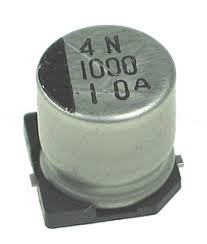
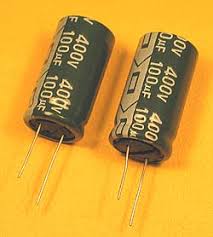
3) The capacitors must be of high quality

High Quality Capacitor
Lower Quality Capacitor

Read More
Posted in windows 7, windows vista, Windows Xp | No comments

Wednesday, 30 September 2009

Some Interesting Modding Ideas

Posted on 23:02 by Unknown
I modded my Aspire 4530 AGAIN to control resultant temperature.
Below are some ideas and pictures.


Another mod idea

This time a black anodized Aluminium heat sink (Can be found in any hardware store) is added to increase the mass.
I had to cut and file it to size.
On the plus side it had thermal adhesive tape under it which makes attaching it an easy task.

Read More
Posted in aspire 4530, modified, temperature, tweak | No comments

Tuesday, 29 September 2009

Microsoft Security Essentials

Posted on 22:33 by Unknown
Microsoft is finally taking responsibility of its OS security.
Microsoft Security Essentials is now Officially Released.
Users have to pass Windows Genuine Authentication before installing.
Download MSE here.
If you have already installed the Beta, the Update to official release should be pushed down via Windows Updates.
The Microsoft Security Essential Scanning Engine is based off its Corporate Counterpart Microsoft ForeFront Security.

Personally I recommend this product as
  • It is FREE.
  • It is a Microsoft Product hence should integrate well with the Operating System (Other Anti-Virus are known to have false positives and has a history of identifying Windows System Files as Virus killing Windows).
  • It is light weight and consumes little System Resources.
Cons
  • Have to pass WGA (This shouldn't really be an issue)
  • May collect System Information from Systems which MAY BE personally identifiable
Read More
Posted in download, microsoft, secure | No comments

How to remove Network Adapter Cleanly

Posted on 07:58 by Unknown
Sometime when you reinstall Network Adapters you see the following
"Wireless Adapter #2"
Which is irritating due to the previous driver "Wireless Adapter" not uninstalled cleanly.

Open Device Manager
Uninstall your Network Adapters
Click "View" "Show Hidden Devices"
Uninstall any duplicate entries.
Go to Windows Registry search for the redundant Network Adapter Entry.
For example if your issue is "Wireless Network Adapter #2"
Then do a search in the registry for "Wireless Network Adapter"
For example if your issue is "Wireless Network Adapter #3"
Then do a search in the registry for "Wireless Network Adapter #2" and "Wireless Network Adapter"
From there you should be able to locate "Wireless Network Adapter" and delete the redundant entries then uninstall and reinstall the network adapter and it should take "Wireless Network Adapter" Name.
Read More
Posted in | No comments

Sunday, 27 September 2009

Disk Cleaning Scheduler

Posted on 07:18 by Unknown


Hi, today I will be sharing a Disk Cleaner Scheduling Script I created.
I took parts of the Temp File Remover Script and combine it with Windows Disk Clean Up.
I also scheduled them to run once a week minimized.
Download it here for Vista
Download it here for Windows 7 (I decided to leave the Prefetch folder alone in Windows 7 since it handles itself well enough.
To install simply Download, Extract and Right Click, run Install.bat with Administrator Permission.
It will create a new Folder called "Clean Disk" in C:\windows (Due to the stupid spacing parsing problem with Program Files) then schedule the tasks.
You can delete the downloaded folders and zip files after that.
To uninstall, Download,Extract and simply Right Click run the Uninstall.bat with Administrator Permission.
I think this will be my final version.
Give your comments.
Thank You.

Edit:
I have updated the script to run as a System Task so the annoying popup that tell you it is cleaning up tempfiles no longer appears.

Read More
Posted in cleanup, disk, download | No comments
Newer Posts Older Posts Home
Subscribe to: Posts (Atom)

Popular Posts

  • OpenWRT Built for TP-Link WR1043ND
    PLEASE READ THIS POST COMPLETELY TO PREVENT ISSUES WITH YOUR ROUTER What this firmware does This firmware aims to be an opensource replaceme...
  • A Simple How to use MiniDLNA on OpenWRT
    SSH/Telnet into the Router The configuration file is located at /etc/config/minidlna The database file is located at /var/run/minidlna/files...
  • K10STAT AMD Griffin Processor UnderVolting Guide
    FAQ Why UnderVolt? Because when a lower voltage can sustain your clockspeed, a stress tested undervolt will preserve battery life a...
  • How to Mod your Laptop VGA BIOS
    Basically there are 2 locations where the VGA BIOS in laptops. Some OEMS embed the VGA BIOS in the EFI/BIOS in your laptops, other OEMs have...
  • Delete Windows System Files
    If you play around with Windows System Files sometimes it is not possible to delte them off after you had your fun. The following commands w...
  • Configuring Pure-FTPd with TLS on OpenWRT
    This is a simple guide to configuring Pure-FTPd on OpenWRT which is available on the TP-Link WR1043ND OpenWRT Image I compiled. Pure-FTPd i...
  • Network Adapter Properties
    802.1p QOS The "802.1p QOS" parameter is a standard that enables Quality of Service (QoS). It is responsible for the QoS provision...
  • Secure Your Windows CD-Key (For Vista and 7)
    As you know everytime you activate a Windows Installation your Product Key can be retrieved via Software means. Don't believe me? Downl...
  • Acer Phoenix BIOS Emergency Recovery
    This is for people who don't listen and interrupt the flashing BIOS for unknown reasons. This will work provided the BIOS BootBlock isn...
  • Internet Explorer Tweak
    Here is a registry tweak for Internet Explorer Similar to the Mozilla Firefox tweak this enable you to increase the number simultaneous ser...

Categories

  • 32bit
  • 64bit
  • acer
  • ahci
  • amd
  • apple
  • aspire 4530
  • aspire 4535G
  • aspire 4740
  • atheros
  • atom
  • BIOS
  • boot
  • cleanup
  • configure
  • device
  • disk
  • dismantle
  • download
  • driver
  • fan control
  • firefox
  • firewall
  • firmware
  • fix
  • flash
  • graphics
  • hwmonitor
  • internet
  • linux
  • macs
  • microsoft
  • modified
  • nvidia
  • optimize
  • overclock
  • performance
  • power savings
  • powermizer
  • proxy
  • ram
  • Realtek
  • review
  • secure
  • shortcut
  • speaker
  • synaptics
  • temperature
  • theme
  • timeline
  • tweak
  • undervolt
  • update
  • wallpaper
  • windows 7
  • windows vista
  • Windows Xp
  • winsat
  • wlan

Blog Archive

  • ▼  2013 (10)
    • ▼  November (2)
      • A Simple How to use MiniDLNA on OpenWRT
      • OpenWRT TL-WDR3600/4300/4310 Release
    • ►  October (3)
    • ►  September (1)
    • ►  August (1)
    • ►  July (1)
    • ►  May (1)
    • ►  January (1)
  • ►  2012 (4)
    • ►  September (1)
    • ►  June (1)
    • ►  March (1)
    • ►  February (1)
  • ►  2011 (21)
    • ►  September (1)
    • ►  July (4)
    • ►  June (3)
    • ►  May (3)
    • ►  April (3)
    • ►  March (4)
    • ►  February (2)
    • ►  January (1)
  • ►  2010 (36)
    • ►  December (3)
    • ►  November (2)
    • ►  October (4)
    • ►  September (1)
    • ►  August (5)
    • ►  July (1)
    • ►  June (5)
    • ►  May (3)
    • ►  April (3)
    • ►  March (6)
    • ►  February (1)
    • ►  January (2)
  • ►  2009 (81)
    • ►  December (3)
    • ►  November (3)
    • ►  October (9)
    • ►  September (5)
    • ►  August (1)
    • ►  July (5)
    • ►  June (8)
    • ►  May (15)
    • ►  April (10)
    • ►  March (13)
    • ►  February (8)
    • ►  January (1)
  • ►  2008 (8)
    • ►  November (5)
    • ►  July (3)
Powered by Blogger.

About Me

Unknown
View my complete profile