Microsoft Laptop

  • Subscribe to our RSS feed.
  • Twitter
  • StumbleUpon
  • Reddit
  • Facebook
  • Digg

Thursday, 1 October 2009

How To Choose What Laptop System To Get?

Posted on 09:14 by Unknown
Basically there are only a few questions you need to ask.
1.Size

How big you need your laptop to be?
Keep in mind size is related to weight, the smaller the laptop the lighter it usually is.
<12.1>
13.1 inches (Mainstream Laptops)
14.1 inches (Mainstream Laptops)
15.1 inches (Mainstream Intensive Gaming Laptops)
16.1 inches (Desktop Replacement)
>16.1 inches (Desktop Replacement)

Usually if you need to move it around 14.1 -15.1 inches would be around the max for mobility.

2.Usage

Processor

Intel

For Intel Processor typically it is easily identified
Intel Core i (Processor Class Number) - (3 Digit SKU Number)(Alphabet 1)(Alphabet 2)

The Processor Class Number is either 3/5 or 7.
3 refers to the low end Processors
5 refers to the mainstream Processors
7 refers to the high end Processors
The 1st Digit SKU Number refers to the instruction set in the Processor.
3X0 means
  1. No Intel® Turbo Boost Technology,
  2. No Intel® Virtualization Technology for Directed I/O (VT-d), 
  3. No Intel® Trusted Execution Technology, 
  4. No AES New Instructions
4X0 means
  1. No Intel® Virtualization Technology for Directed I/O (VT-d), 
  2. No Intel® Trusted Execution Technology, 
  3. No AES New Instructions
5X0 and above
  1. All Instruction Set Supported
The 2nd Digit refers to the different Frequency of the Processor Family

For the alphabet there are a number of fixed Alphabets
M - Mainstream
Q - Quad Core (4 Cores, 8 Threads, No Intel HD Graphics due to high TDP)
X - Xtreme (Unlocked Multiplier)
U - Ultra Low Voltage (Low Frequency + Low Voltage)
L - Low Voltage (Low Voltage only)
E - Embedded (Not Upgradable)
AMD

For AMD Processor it is not as easy.

Generation Griffin
Identifier:
AMD (Model) X(No. of Cores) (SKU Alphabet)-(Frequency Identifier No.)(Odd/Even Last Digit)
  1. Turion refers to high end model
  2. Athlon refers to mainstream model
  3. Sempron refers to low end model
X2 refers to Dual Core

Ultra refers to Total 2MB L2 Cache otherwise 1MB L2 Cache or less.

ZM refers to Turion Processor with 3 Power State
RM refers to Turion Processor with 3 Power State
QL refers to Athlon Processor with 2 Power State
SI refers to Total 512 KB Cache with 2 Power State
Frequency Identifier No. starts from 4X to 8X.
  1. RM-70 starts from 2GHZ (Every 2 increase Frequency Increase by 100MHZ ) Odd Last Digit refers to an increase in HyperTransport Frequency from the Even Digit SKU  
  2. RM-80 starts from 2.1GHZ (Every 2 increase Frequency Increase by 100MHZ ) Odd Last Digit refers to an increase in HyperTransport Frequency from the Even Digit SKU  
  3. V refers to Low Voltage Processor
Generation Caspian
Identifier:
AMD (Model) (Generation II) Ultra (No. of Cores) (Type Alphabet) (3 Digit SKU No.)
  1. Turion refers to high end model
  2. Athlon refers to mainstream model
  3. Sempron refers to low end model
Generation II refer to K10 Architecture

Ultra refers to Total 2MB L2 Cache otherwise 1MB L2 Cache or less.

Type Alphabet
  1. M refers to Mainstream
  2. L refers to Low Voltage
3 Digit SKU
6XX refers to Turion Ultra Series Starting from 2.4 GHZ, every increment in 20 increase by 100MHZ with 5 Power States
5XX refers to Turion Series Starting from 2.2 GHZ, every increment in 20 increase by 100MHZ with 5 Power States
3XX refers to Athlon Series Starting from 2.0 GHZ, every increment in 20 increase by 100MHZ with 3 Power States
Note Starting Frequency of L Series differ from M Series

Generation Champlain
 
The Generation Caspian adds Quad Core Mobile Processor to the market.

Identifier: X NNN
X is either X for Black Edition (Unlocked Multiplier 45 Watt TDP ), N for MainStream (35 Watt TDP) & P for MainStream Lower Power Consumption (25 Watt TDP), V for Low End (25 TDP Single Core).

1st Digit refers to SKU
9 - Quad Core with 21.3GB/s HyperTransport
8 - Triple Core with 21.3GB/s HyperTransport
6 - Dual Core with 21.3GB/s HyperTransport
5 - Dual Core with 17GB/s HyperTransport
3 - Dual Core with 64bit Floating Point Unit (I suspect it is the old Caspian Refresh) (All the new Champlain should have 128Bit Floating Point Units) 17GB/s HyperTransport
1 - Single Core with 64bit Floating Point Unit

All Champlain Generation has 0.5 MB L2 Cache per CPU Core.

Graphics (For Gaming GPU > CPU)

For occasional gaming get at least some decent graphics from Nvidia, ATi.
For Intel Graphics if you must at least go for 3150,4500MHD or the new Intel HD Graphics.
They have Video Codec Decoding Abilties for Adobe Flash 10.1.
For ATi any Radeon HD will do, DO NOT go for Radeon Xpress they are obselete.
For Nvidia, go for anything below 8000 Series. 7000 series are obselete.
Both Nvidia 7000 Series and Radeon Xpress do not support GPU computing and DirectX 10
Use Notebookcheck as a rough guide for gaming performance.
Class 3, Class 2, Class 1 are suitable for occasional gaming.

For more intensive gaming consider getting Class 2 and Class 1 Graphics however they are most available only on 14.1/15.1 inch and above laptops.
Reason being more powerful graphics requires more powerful fansink these contributes to size hence usually they can only be found on 14.1 inch and above systems.

RAM
I don't really bother as it is very easy and cheap to upgrade laptop RAM.
You get more cost saving upgrading RAM yourself than buying a high RAM laptop.

Harddisk
Size is of no concern as they come with at least 120GB and that is more than sufficient.

Edit:
With regards to how good a laptop is in terms of quality you have to look at the design layout.
1) Google the motherboard prints of the particular laptop
2) Heatsink size must be sufficiently large enough particularly for AMD Processor Laptops and those with Nvidia/ATi GPU, larger mass allows higher heat capacity so temperature will not be too high.
The GPU, CPU and Northbridge must not be too close to each other.

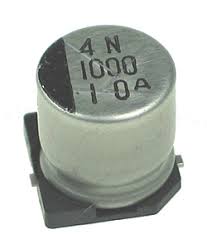
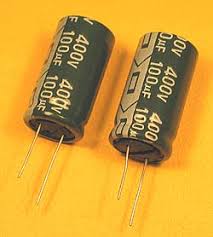
3) The capacitors must be of high quality

High Quality Capacitor
Lower Quality Capacitor

Read More
Posted in windows 7, windows vista, Windows Xp | No comments

Wednesday, 30 September 2009

Some Interesting Modding Ideas

Posted on 23:02 by Unknown
I modded my Aspire 4530 AGAIN to control resultant temperature.
Below are some ideas and pictures.


Another mod idea

This time a black anodized Aluminium heat sink (Can be found in any hardware store) is added to increase the mass.
I had to cut and file it to size.
On the plus side it had thermal adhesive tape under it which makes attaching it an easy task.

Read More
Posted in aspire 4530, modified, temperature, tweak | No comments

Tuesday, 29 September 2009

Microsoft Security Essentials

Posted on 22:33 by Unknown
Microsoft is finally taking responsibility of its OS security.
Microsoft Security Essentials is now Officially Released.
Users have to pass Windows Genuine Authentication before installing.
Download MSE here.
If you have already installed the Beta, the Update to official release should be pushed down via Windows Updates.
The Microsoft Security Essential Scanning Engine is based off its Corporate Counterpart Microsoft ForeFront Security.

Personally I recommend this product as
  • It is FREE.
  • It is a Microsoft Product hence should integrate well with the Operating System (Other Anti-Virus are known to have false positives and has a history of identifying Windows System Files as Virus killing Windows).
  • It is light weight and consumes little System Resources.
Cons
  • Have to pass WGA (This shouldn't really be an issue)
  • May collect System Information from Systems which MAY BE personally identifiable
Read More
Posted in download, microsoft, secure | No comments

How to remove Network Adapter Cleanly

Posted on 07:58 by Unknown
Sometime when you reinstall Network Adapters you see the following
"Wireless Adapter #2"
Which is irritating due to the previous driver "Wireless Adapter" not uninstalled cleanly.

Open Device Manager
Uninstall your Network Adapters
Click "View" "Show Hidden Devices"
Uninstall any duplicate entries.
Go to Windows Registry search for the redundant Network Adapter Entry.
For example if your issue is "Wireless Network Adapter #2"
Then do a search in the registry for "Wireless Network Adapter"
For example if your issue is "Wireless Network Adapter #3"
Then do a search in the registry for "Wireless Network Adapter #2" and "Wireless Network Adapter"
From there you should be able to locate "Wireless Network Adapter" and delete the redundant entries then uninstall and reinstall the network adapter and it should take "Wireless Network Adapter" Name.
Read More
Posted in | No comments

Sunday, 27 September 2009

Disk Cleaning Scheduler

Posted on 07:18 by Unknown


Hi, today I will be sharing a Disk Cleaner Scheduling Script I created.
I took parts of the Temp File Remover Script and combine it with Windows Disk Clean Up.
I also scheduled them to run once a week minimized.
Download it here for Vista
Download it here for Windows 7 (I decided to leave the Prefetch folder alone in Windows 7 since it handles itself well enough.
To install simply Download, Extract and Right Click, run Install.bat with Administrator Permission.
It will create a new Folder called "Clean Disk" in C:\windows (Due to the stupid spacing parsing problem with Program Files) then schedule the tasks.
You can delete the downloaded folders and zip files after that.
To uninstall, Download,Extract and simply Right Click run the Uninstall.bat with Administrator Permission.
I think this will be my final version.
Give your comments.
Thank You.

Edit:
I have updated the script to run as a System Task so the annoying popup that tell you it is cleaning up tempfiles no longer appears.

Read More
Posted in cleanup, disk, download | No comments

Saturday, 26 September 2009

Acer Aspire 3810TZ Quick Review

Posted on 21:02 by Unknown
I got my hands on one of the new Timeline Series Laptop 3810TZ costing only 899 SGD (around 618 USD)
Firstly you should run Empowering BackUp to backup the 13GB factory image and Software driver to 3 DVDs altogether.
As you know Acer loads their laptop with useless software so I before I used it, I reloaded Vista over the factory default partition.
You can decide to destroy the 13GB Recovery Partition if you are short on Disc Space.

The full specification are as follows.
  • Intel Pentium Processor SU2700 (1.3GHZ,800FSB)
  • **Note the newer 3810TZ comes with a Dual Core SU4100
  • Intel GMA 4500MHD(Up to 732MB shared)
  • 13.3" HD LED LCD
  • 2GB DDR3 Memory (Single Stick) Elpida
  • 160GB HDD Seagate ST9160310AS
  • Atheros AR5B93 b/g/n Wireless Network Adapter

More details:

It uses the new GS45 Intel Chipset together with a Ultra Low Voltage Processor U2700 the power savings are tremedous.

Thermal Temperatures are also very low as can be seen.

The red box is the max temperature after I stressed the CPU with Intel Burn In utility.
As you can see the temperature are extremely low thanks to the ULV Processor plus the Laminar Wall Jet Cooling.

As you can see CPUZ has yet to detect this new CPU Correctly.
The Screenshot also shows why this laptop is desirable than most Netbooks.
Firstly it has 64bit support unlike most Atoms.

VT is locked? Meaning there is a way around it? Further Investigation pending.
After investigation VT is not present on SU2700 however SU3500 supports VT as well as SU9400 .
To unlock VT a simple guide is available here


It is interesting to note the particular machine only has a single stick of RAM installed meaning upgrading is NOT problematic at all.


As you can see the low score is due to some incomplete tests like Anti-Aliasing not available on this machine.

Few things to note:
  • Acer isn't lying about the 8hr operating life by tapping the shortcut button on the top right corner battery life can reach approximately 8hrs.
  • No bluetooth is installed on this system but adding it is possible.
  • The Processor on Paper seems pretty weak low frequency,Single Core etc, but in actual fact it will suffice for most applications.
  • A clean vista install will make the entire system quicker and more responsive, there is no need to revert to Windows Xp.
  • The notebook never overheats.
  • It is not likely to encounter hardware issues, however problematic Acer software is a possibility although I didn't encounter both.
  • The acoustics is low fan, spin hardly audible but is efficient at thermal removal.
  • It is cheap and value for money.
  • If you don't need Processor Power this laptop is the way to go.
  • It is light and sleek. At 1.6Kg and 1" thin it is highly portable plus the design look pleasant and professional.
  • Not recommended if you require a more powerful processor or you want to play games on the laptop.
  • For Acer to achieve this thinness the lid was slightly compromised if you press on the lid you could see the temporary color change effect on the Monitor so just be gentle with the lid.
  • The Processor is non-upgradable it is soldered to the motherboard using BGA Soldering (Ball Grid Array)
I really recommend this laptop because of the unique features it possess not found in laptops from other vendors (How many laptops do you know of that cost less than 700USD yet has 8hr battery life?).
As of yet no overclocking tools is available to "value add" the processor however in the future when more GS 45 platform based laptop appear the support might be added.

Customize the Aspire Timeline buttons
It is possible to undervolt it using RMClock and overclock using SetFSB.
For the SU 3500 and SU9400 but not the SU2700.
Acer Timeline Fan Control
0x1F for fan off.
0x1A for fan low mode.
0x1C for fan mid mode.

So far I was not able to find the high mode setting. But therefor the auto mode (0x00) is a good alternative untill the correct value is found.

Now enjoy your silent notebook!

Here are the important code lines from my "options.ini":

[Modes]
Auto=0x00
Stop=0x1F
Slow=0x1A
Medium=0x1C

[Schemes]
Auto="Auto"
Example_scheme="Stop, Slow, 40, Slow, 45, Medium, 50, Auto, 53"

Edit: Unfortunately these values are not correct for the battery mode! For Example 0x1F becomes medium mode.
Acer Aspire Timeline Tweaks
How to OverClock Acer Aspire Timeline X810
Realtek Driver Audio Mod for Better Sound

Update:
To fully utilise the touchpad please update the drivers at laptopvideo2go.
The Acer Shipped Drivers does not come with 3 finger gesture which the new Drivers at laptopvideo2go enables.

If you happen to encounter a bad BIOS/EFI flash do the following:
  1. Put Flashit.exe (DOS) on a Thumbdrive
  2. Rename the BIOS/EFI Image file to JM31X64.fd and put it in the thumbdrive as well
  3. Plug in the thumbdrive to the powered down machine
  4. Press and hold 3 buttons Fn + Esc + Power Button (With AC Adapter + Battery plugged in)
  5. Release when it reads the thumbdrive.
  6. After a while you should hear fan spinning furiously after it is done it should boot fine
  7. All the above will work provided you didn't screw up the bootblock.
Read More
Posted in acer, review, timeline | No comments

Tuesday, 25 August 2009

Secure Your Windows CD-Key (For Vista and 7)

Posted on 05:45 by Unknown
As you know everytime you activate a Windows Installation your Product Key can be retrieved via Software means.
Don't believe me?
Download this and retrieve your Product Key in Clear Text.
So is there an alternative solution so people will not steal your Product Key from your computer when you are not looking?
Yes there is.
Open Command Prompt with Administrative Permission and Run the following commands.
slmgr /cpky
If you try to retrieve your Product Key again with the same software, you will get this.

The Registry Entry Containing the Product Key has been cleared and Windows remains activated!
Read More
Posted in secure, windows 7, windows vista | No comments
Newer Posts Older Posts Home
Subscribe to: Posts (Atom)

Popular Posts

  • Delete Windows System Files
    If you play around with Windows System Files sometimes it is not possible to delte them off after you had your fun. The following commands w...
  • Internet Explorer Tweak
    Here is a registry tweak for Internet Explorer Similar to the Mozilla Firefox tweak this enable you to increase the number simultaneous ser...
  • How to Mod your Laptop VGA BIOS
    Basically there are 2 locations where the VGA BIOS in laptops. Some OEMS embed the VGA BIOS in the EFI/BIOS in your laptops, other OEMs have...
  • Acer Phoenix BIOS Emergency Recovery
    This is for people who don't listen and interrupt the flashing BIOS for unknown reasons. This will work provided the BIOS BootBlock isn...
  • Secure Your Windows CD-Key (For Vista and 7)
    As you know everytime you activate a Windows Installation your Product Key can be retrieved via Software means. Don't believe me? Downl...
  • Changing the Acer Arcade Shortcut
    While surfing the Windows Registry (You must be thinking that I am weird =P) yesterday I found something interesting It is actually possible...
  • Some Interesting Modding Ideas
    I modded my Aspire 4530 AGAIN to control resultant temperature. Below are some ideas and pictures. Another mod idea This time a black anodi...
  • How to obtain the DSDT from your laptop
    There are many ways to rip the DSDT out of the laptop BIOS. If there is a BIOS editor it is possible to rip out the .AML file. However below...
  • Acer Aspire 4530 Boot Screen
    Acer Aspire 4530 Boot Dianogostic Screen PhoenixBIOS 4.0 Release 6.1 Copyright 1985-2008 Phoenix Technologies Ltd. All Rights Reserve 1.052....
  • List Of Modified BIOS Collection
    Here are the list of Modified BIOS Collection (mainly SLIC Mods), no warranty provided use at your own discretion! Acer Aspire 4520G BIOS Ac...

Categories

  • 32bit
  • 64bit
  • acer
  • ahci
  • amd
  • apple
  • aspire 4530
  • aspire 4535G
  • aspire 4740
  • atheros
  • atom
  • BIOS
  • boot
  • cleanup
  • configure
  • device
  • disk
  • dismantle
  • download
  • driver
  • fan control
  • firefox
  • firewall
  • firmware
  • fix
  • flash
  • graphics
  • hwmonitor
  • internet
  • linux
  • macs
  • microsoft
  • modified
  • nvidia
  • optimize
  • overclock
  • performance
  • power savings
  • powermizer
  • proxy
  • ram
  • Realtek
  • review
  • secure
  • shortcut
  • speaker
  • synaptics
  • temperature
  • theme
  • timeline
  • tweak
  • undervolt
  • update
  • wallpaper
  • windows 7
  • windows vista
  • Windows Xp
  • winsat
  • wlan

Blog Archive

  • ▼  2013 (10)
    • ▼  November (2)
      • A Simple How to use MiniDLNA on OpenWRT
      • OpenWRT TL-WDR3600/4300/4310 Release
    • ►  October (3)
    • ►  September (1)
    • ►  August (1)
    • ►  July (1)
    • ►  May (1)
    • ►  January (1)
  • ►  2012 (4)
    • ►  September (1)
    • ►  June (1)
    • ►  March (1)
    • ►  February (1)
  • ►  2011 (21)
    • ►  September (1)
    • ►  July (4)
    • ►  June (3)
    • ►  May (3)
    • ►  April (3)
    • ►  March (4)
    • ►  February (2)
    • ►  January (1)
  • ►  2010 (36)
    • ►  December (3)
    • ►  November (2)
    • ►  October (4)
    • ►  September (1)
    • ►  August (5)
    • ►  July (1)
    • ►  June (5)
    • ►  May (3)
    • ►  April (3)
    • ►  March (6)
    • ►  February (1)
    • ►  January (2)
  • ►  2009 (81)
    • ►  December (3)
    • ►  November (3)
    • ►  October (9)
    • ►  September (5)
    • ►  August (1)
    • ►  July (5)
    • ►  June (8)
    • ►  May (15)
    • ►  April (10)
    • ►  March (13)
    • ►  February (8)
    • ►  January (1)
  • ►  2008 (8)
    • ►  November (5)
    • ►  July (3)
Powered by Blogger.

About Me

Unknown
View my complete profile