


Here is the deal:
You have encounter high temperatures especially during gaming.
You contacted the Repair Centre.
They told you to update the BIOS (usually the fix include making the fan spin more often).
You have sent the laptop back and forth until you have given up.
Finally the warranty run out and you can only depend on yourself.
Below are the following mods you can do.

 Arctic Silver 5


You have encounter high temperatures especially during gaming.
You contacted the Repair Centre.
They told you to update the BIOS (usually the fix include making the fan spin more often).
You have sent the laptop back and forth until you have given up.
Finally the warranty run out and you can only depend on yourself.
Below are the following mods you can do.
For me I did the following:
Note: Most steps require dismantling of the system it will help with expert supervision and googling and down loading of service manual to dismantle it.
Note: Most steps require dismantling of the system it will help with expert supervision and googling and down loading of service manual to dismantle it.
- Throw away the thermal pad on the GPU and use Arctic Silver 5 instead
- Remove the original CPU thermal paste and use Arctic Silver 5 instead.
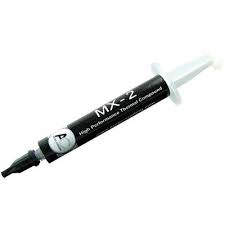
Arctic Cooling MX-2
 Arctic Silver 5
- Remove and throw away the "air filter" below the Laptop bottom cover to allow better air flow (I decided to do this after realizing this is the only part you can feel that air actually goes into the laptop, hence obstructing it restricts air flow hence remove it)
- Sand the surface of heatsink which comes into contact with the GPU or CPU chip, using FINE SILICON CARBIDE PAPER
- Sharpen the edges of the air vent casing (I got this inspiration by observing other Acer Aspire Laptop (Aspire 4935G) models, I noticed their vent size is gigantic compared to the vent size of this particular model hence it could be one of the gaming overheating factors. The new Acer Aspire 4736ZG Series Air Vents actually have even bigger holes than 4935G!)
Original (Top view)

Modified (Shave the vent corners)(Top view)

Actually the best cutting should be a wing shape pointing into the chassis.
The smaller the air drag the better.
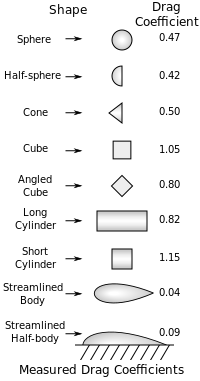
Not sure how much of this helps
But now my gaming temperatures fall below 90 degrees (around 85) and my idle temperature falls below 60 degrees (around 55) for the GPU.
Check out my recently modded laptop thermal exhaust:

Compare it to your original Aspire 4530 exhaust spot any difference?
Originally it has 16 dividers I cut out 8 of them so it looks like this.
Originally it has 16 dividers I cut out 8 of them so it looks like this.
5) I added Aluminium tape to bridge the laptop bottom chassis which is made out of metal to the heatsink.

Aluminium Tape
How I did it.

I rolled and flatten out one piece of Aluminium Tape to thicken it made sure it stucked in between the two interface without falling off (but not too tight).
Then I stick a tape over the heatsink and the chassis for better conduction.
The lowest temperature is now under 55 degrees hence it pretty much works.
7) Set the Graphics Mode to performance.


